Profiling a PyTorch Training Job End to End
How to decide whether a training job is blocked on data, PyTorch overhead, or a hot CUDA kernel, using torch.profiler, Nsight Systems, and Nsight Compute in the right order.
TL;DR
When a PyTorch training job feels slow, the most expensive mistake is starting at the wrong layer.
In this case study, I built a small synthetic training lab and used it to force three common bottlenecks:
- a data-bound job
- a torch/eager-overhead-bound job
- a kernel-bound job
The main conclusions were straightforward:
- If
DataLoaderdominates self CPU time and CUDA time is tiny, optimize the input pipeline first. - If
cudaLaunchKernelis large and the profiler shows thousands of smallaten::ops, you are paying for eager execution and launch overhead. - If Nsight Compute shows high DRAM throughput and low compute throughput, the hot kernel is memory-bound, and mixed precision may not help.
The tool order mattered as much as the results:
- Measure plain step time first.
- Use
torch.profilerto classify the bottleneck. - Use
nsysto understand the whole-step timeline. - Use
ncuonly after you know which kernel family is actually hot.
That workflow consistently answered the question faster than jumping straight into kernel metrics.
Why This Post Exists
Most performance debugging discussions start too deep.
The usual arc looks like this:
- the model is slow
- we open Nsight Compute
- we stare at occupancy, cache throughput, and DRAM utilization
- and only later realize the GPU was mostly idle because the data loader was starved
That is backwards.
This post is an intentionally controlled exercise in learning the opposite habit: start broad, classify the problem, then zoom in. The code is synthetic on purpose. I was not trying to build a meaningful model; I was trying to build a repeatable lab for learning how to reason about a real one.
Setup
All numbers in this post were collected on the local machine backing this repo:
- GPU:
NVIDIA GeForce RTX 5080 - Driver:
595.79 - PyTorch:
torch 2.10.0+cu128 - OS: WSL2 kernel
6.6.87.2-microsoft-standard-WSL2
The original Markdown source for this post lives in the companion repo at docs/pytorch_training_optimization_blog.md. I bundled the generated artifacts here so the writeup stays self-contained.
The raw artifacts for this article are checked in:
- timing table: timings.csv
- structured run summaries: results.json
- charts live alongside this post bundle
- torch profiler outputs:
- Nsight Systems summary: blog_torch_nsys_stats.txt
- Nsight Compute summary: blog_kernel_ncu.txt
The Workload
The lab exposes four presets:
baseline: a small healthy-enough referencedata: expensive CPU preprocessing and a slow input pipelinetorch: a model with many tiny eager elementwise opskernel: a model with repeated pointwise CUDA-heavy blocks
The three code fragments below are the important ones.
The input pipeline:
| |
The eager-overhead-heavy forward:
The kernel-heavy forward:
These patterns were chosen because they produce familiar profiler signatures:
- input stalls
- too many tiny launches
- memory-bound pointwise kernels
Methodology
I used the same measurement rules for every experiment.
- I measured steady-state step time by skipping the first two steps.
- I kept the benchmark metric aligned with the optimization goal.
- For data and kernel experiments, step time was the main metric.
- For torch/eager-overhead experiments, throughput was the more useful metric.
That last point matters. A larger batch can increase step time while still improving throughput. If the goal is training throughput, that is still a win.
I generated the experiment matrix with:
| |
The Result Table
These are the steady-state numbers from timings.csv.
| Case | Steady-state step ms | p50 ms | Throughput samples/s | Main takeaway |
|---|---|---|---|---|
| Baseline | 3.20 | 3.45 | 79,947 | Healthy reference run |
| Data, workers=0 | 622.37 | 620.95 | 411 | Completely input-bound |
| Data, workers=4 | 106.70 | 1.99 | 2,399 | Faster on average, still bursty |
| Data, workers=8 | 43.79 | 1.69 | 5,846 | Better again, but starvation remains |
| Torch eager, batch=256 | 6.14 | 6.16 | 41,724 | Many tiny launches |
| Torch eager, batch=1024 | 9.56 | 8.46 | 107,120 | Higher step time, much higher throughput |
| Kernel fp32 | 4.49 | 3.93 | 114,004 | Best kernel-mode variant here |
| Kernel bf16 | 4.67 | 3.82 | 109,530 | Slight regression on this workload |
The table already suggests the main themes, but the charts make the reasoning much easier to see.
Experiment 1: Diagnosing a Data Bottleneck
The data experiment was designed to answer the simplest possible question: what does an obviously input-bound training job look like when you profile it correctly?
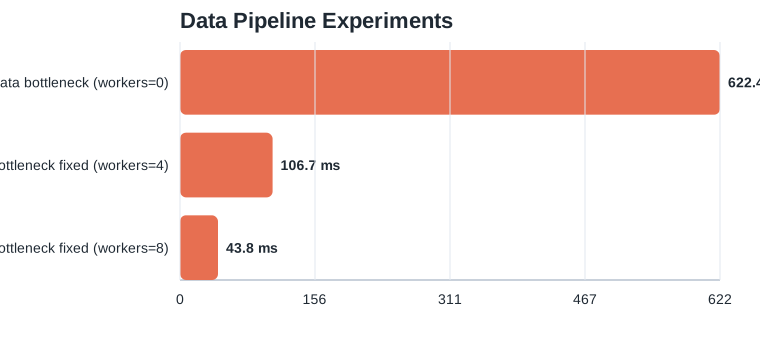
The bar chart gives the first answer:
The step-time improvement was large:
workers=0 -> workers=4:622.37 ms -> 106.70 ms, a5.83ximprovementworkers=0 -> workers=8:622.37 ms -> 43.79 ms, a14.21ximprovement
If I stopped there, I would write a decent benchmark note. But the more interesting chart is the jitter chart:
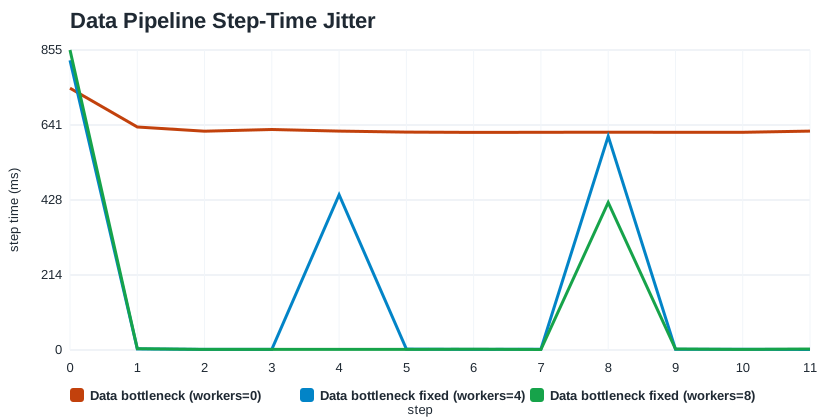
This chart is the reason I kept both average and p50 in the dataset.
What it shows:
workers=4has a tinyp50of1.99 ms, but the average is still106.70 msworkers=8has a tinyp50of1.69 ms, but the average is still43.79 ms- most steps are fast, but the queue periodically drains and one step suddenly spikes into the hundreds of milliseconds
That is the first practical lesson of the post:
For input pipelines, the median alone can lie.
If you only looked at p50, you would think the problem was solved at num_workers=4. The jitter chart makes it obvious that the system is still periodically starving the GPU.
What torch.profiler Said
I profiled the slowest data case with:
The strongest signals from blog_data_profile.txt were:
enumerate(DataLoader)...consumed92.16%of self CPU time- total self CPU time was
3.960s - total self CUDA time was only
7.411ms
That is exactly the profile I want to see before I decide not to touch kernels:
- the CPU is busy preparing batches
- the GPU is mostly waiting
- kernel-level tuning would be premature
What I Would Optimize Next
The first optimization was already visible in the benchmark:
If I were continuing this line of work on a real training job, the next steps would be:
- increase
num_workersuntil the jitter curve stops improving - reduce CPU transforms in
__getitem__ - cache or precompute expensive preprocessing
- verify overlap between host-to-device copies and compute
The important point is not that num_workers helps. It is that the profiler made it obvious that the right place to work was the data path, not the kernel path.
Experiment 2: Diagnosing Torch / Eager Overhead
The torch preset was designed to create the kind of workload that feels “GPU-ish” at a glance but is really dominated by lots of small ops and lots of launches.
Here the most useful chart is throughput, not step time:
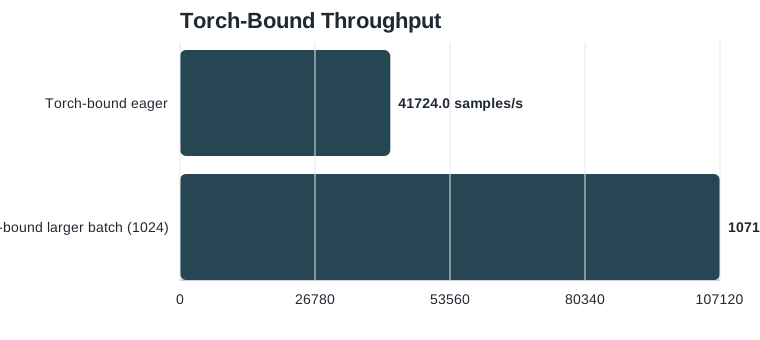
The raw numbers were:
- batch
256:41,724 samples/s - batch
1024:107,120 samples/s - throughput improvement:
2.57x
At the same time:
- batch
256:6.14 mssteady-state step time - batch
1024:9.56 mssteady-state step time
That contrast is exactly why this section matters.
If I used step time as the headline metric, I would conclude that the larger batch is worse. If I use throughput, I see what is actually happening: each step is doing much more useful work, and the model is paying less overhead per sample.
That is the second practical lesson:
In launch-bound workloads, step time and throughput can point in opposite directions. Know which one matches your goal.
What torch.profiler Said
I profiled the eager case with:
The most useful lines from blog_torch_profile.txt were:
cudaLaunchKernel:20.59%self CPU time,3264callsaten::mul:1152callsaten::add:576callsaten::sigmoid_backward:288calls
That is a classic eager-overhead signature:
- many tiny
aten::ops - a lot of host-side launch work
- no single heavy operator explaining most of the runtime
This is the moment where I stop thinking “maybe the GEMMs are slow” and start thinking “I am spending too much time dispatching tiny pieces of work.”
What Nsight Systems Added
I then profiled the same workload with:
And summarized it with:
| |
The most useful findings from blog_torch_nsys_stats.txt were:
- NVTX range summary:
forward:62.8%backward:20.4%data_loader:12.6%
- CUDA API summary:
cudaLaunchKernel:71.0%of CUDA API time
- GPU kernel summary:
- many
vectorized_elementwise_kernellaunches - a smaller number of GEMM kernels
- many
That completes the story:
torch.profilersays “many tiny ops”nsyssays “the host is spending a huge fraction of CUDA API time launching kernels”
Those two tools are pointing in the same direction, which is exactly what you want before you make an optimization call.
What I Would Optimize Next
The cleanest optimization I could validate on this machine was increasing batch size:
That raised work per launch and improved throughput significantly.
I also tried torch.compile, which would normally be my next experiment. On this machine it failed before benchmarking because Triton could not find Python.h. That is not a model issue; it is an environment issue.
The fix would be:
That is a useful reminder in its own right:
Before you evaluate
torch.compile, make sure the environment can actually build Triton / Inductor artifacts.
Experiment 3: Diagnosing a Kernel Bottleneck
The kernel preset repeats pointwise blocks so that the hot path shifts closer to CUDA kernels themselves.
I compared fp32 and bf16:
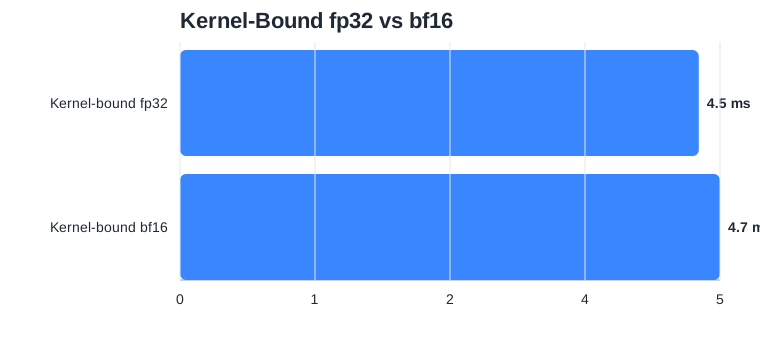
The result was small but informative:
- fp32:
4.49 ms - bf16:
4.67 ms - bf16 regression: about
4%
That is the third practical lesson:
Mixed precision is not an automatic win.
If the hot path is dominated by memory-bound pointwise kernels rather than large tensor-core-friendly matrix multiplies, bf16 may not help and can even regress slightly.
What Nsight Compute Said
I profiled one representative hot kernel with:
The key metrics from blog_kernel_ncu.txt were:
Memory Throughput:85.09%DRAM Throughput:85.09%Compute Throughput:13.75%Achieved Occupancy:73.08%Grid Size:2048Waves Per SM:2.03
That is the signature of a memory-bound pointwise kernel:
- memory throughput is already high
- compute throughput is much lower
- occupancy is decent enough that “just raise occupancy” is not the whole answer
In other words, the bottleneck is not “the SMs are idle because my math is too small.” It is closer to “I am moving data through too many pointwise passes.”
What the Code Suggests
The pressure comes from this pattern:
The likely optimization directions are:
- reduce the number of separate pointwise passes
- fuse operations where possible
- try
torch.compileafter fixing the environment - only then revisit mixed precision
What would not make sense is toggling AMP and calling it a day. ncu already told us the memory system is the dominant pressure.
How I Read the Three Tools Together
Each tool answered a different question.
torch.profiler
Best for classification.
What I look at first:
- self CPU time
- CUDA time
- number of calls
This tool tells me whether I should be thinking about data loading, eager overhead, or a smaller set of heavy operators.
Nsight Systems
Best for whole-step timelines.
What I look at first:
- NVTX range summary
- CUDA API summary
- GPU kernel summary
This tool tells me how the step is composed and whether the host is paying too much dispatch overhead.
Nsight Compute
Best for hot-kernel diagnosis.
What I look at first:
- memory throughput
- compute throughput
- occupancy
- grid size and waves per SM
This tool tells me whether the kernel is launch-bound, memory-bound, or compute-bound.
A Practical Decision Tree
This is the workflow I would now recommend for a real PyTorch training job.
- Measure step time and throughput in steady state.
- Run
torch.profiler. - If data loading dominates, stop there and fix the input pipeline.
- If there are many tiny
aten::ops and lots of launch overhead, simplify the graph or increase useful work per launch. - If a small family of kernels dominates, move to
nsys. - Only after identifying the hot kernel family, move to
ncu.
That sequence is slower than guessing, but faster than tuning the wrong layer.
Reproducing the Experiments
Generate the timing matrix and SVG charts:
| |
Profile the data-bound case:
Profile the torch-bound case:
Run Nsight Systems:
Run Nsight Compute:
Closing Thought
The point of this exercise was not to prove that one trick is universally good.
It was to show that different bottlenecks leave different fingerprints:
- the data-bound job spent almost all of its time on the CPU preparing batches
- the torch-bound job spent too much host time launching too many tiny kernels
- the kernel-bound job was limited by memory throughput, not compute throughput
That is why the right performance question is never just “how do I optimize PyTorch?” The right question is:
Which layer is actually responsible for the time I am paying right now?
Once that answer is clear, the optimization path usually becomes much less mysterious.